
 Twitter
 Facebook
 YouTube
 Blog
BlogPurpose of the ARP Scan tool
This tool uses ARP packets to discover all active devices in an IPv4 range (usually a subnet) even if protected by a firewall designed to hide the presence of the device. Whether you are using ethernet or WIFI, the IPv4 devices on your LAN must respond to ARP or they cannot communicate. This is a MAC Address Scanner.About the ARP Scan Tool
The ARP Scan Tool (AKA ARP Sweep or MAC Scanner) is a very fast ARP packet scanner that shows every active IPv4 device on your subnet. Since ARP is non-routable, this type of scanner only works on the local LAN (local subnet or network segment).
The ARP Scan Tool shows all active devices even if they have firewalls. Devices cannot hide from ARP packets like they can hide from Ping. To find active IP addresses outside your subnet, use the Ping Scan Tool (a Ping Sweep tool - NetScanner).
Related Tool Links
- ARP Cache Tool.
- ARP Ping.
- Packet Generator - has an ARP/RARP packet generating mode.
ARP Scan Screenshot
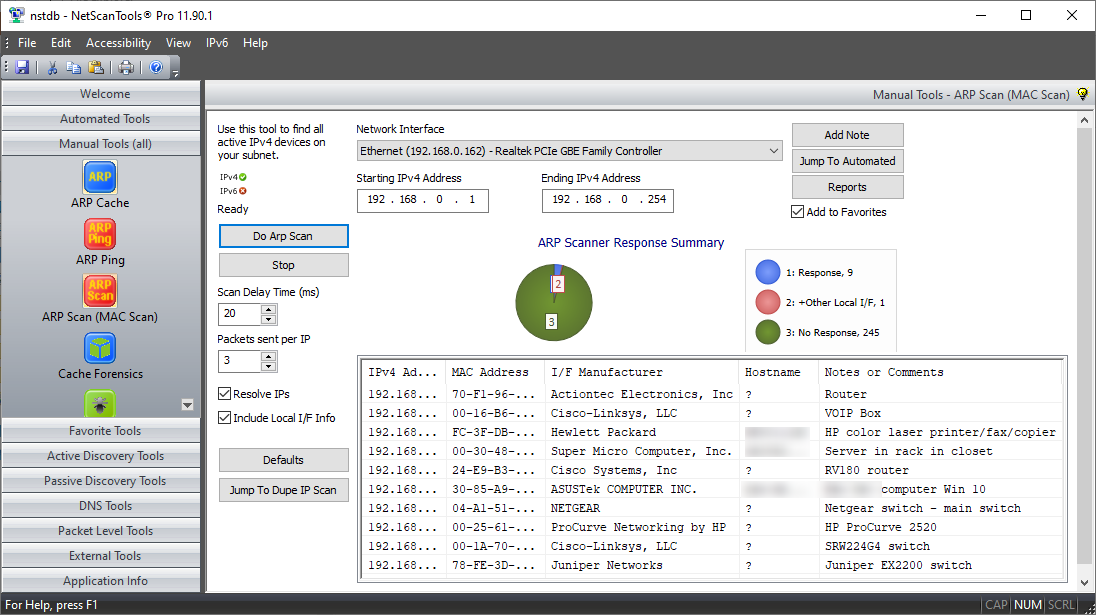
How the ARP Scan Tool works
The tool sends ARP Packets to every IPv4 address in the range and looks for the mandatory ARP Reply.
You are limited to scanning IP addresses in your subnet - why? Because ARP is not routed. IPv4 connected devices cannot hide from ARP - the must respond if they are to be communicating using IPv4 ethernet.It displays ARP replies with the corresponding IPv4 address.
Shows all devices responding with an ARP reply message during the scan. The manufacturer of each remote device's network interface is shown. The hostname for each IP address can be optionally shown.Make notes or comments to go with each MAC address.
You can add a note that is tied to each MAC address so if the IPv4 address changes in a DHCP environment, the note will stay with the MAC address.Results Pie Chart

A video of the ARP Scan Tool in action!
Try the NetScanTools Pro demo free for 30 days
DEMO Version End User License Agreement (EULA)How to Uninstall


NetScanTools is a registered trademark of Northwest Performance Software, Inc.
'NetScanTools Pro', 'NetScanTools Standard', 'ipPulse', 'Northwest Performance Software' and 'NetScanTools.com', are trademarks of Northwest Performance Software, Inc.
Any trademarked names mentioned herein are the property of their respective owners.
About Us
Email Us
Call Us
Help & Support Center
NetScanTools® Pro Topics
© 2024 Northwest Performance Software, Inc. All Rights Reserved. | Privacy Policy