
 Twitter
 Facebook
 YouTube
 Blog
BlogPurpose of the Passive Discovery Tool
This tool passively listens to IPv4 traffic on your network and provides a list of active IPv4 devices on your subnet.About the Passive Discovery Tool
The Passive Discovery Tool shows devices 'talking' on your subnet by listening to TCP, UDP, and ICMP traffic. You see:
- Source IPv4 address and time of last packet.
- Protocol used: TCP, UDP, ICMP.
- The source and destination port of the packet (if applicable).
- The total number of packets received from the source during this monitoring session.
Related Tool Links
Passive Discovery Screenshot
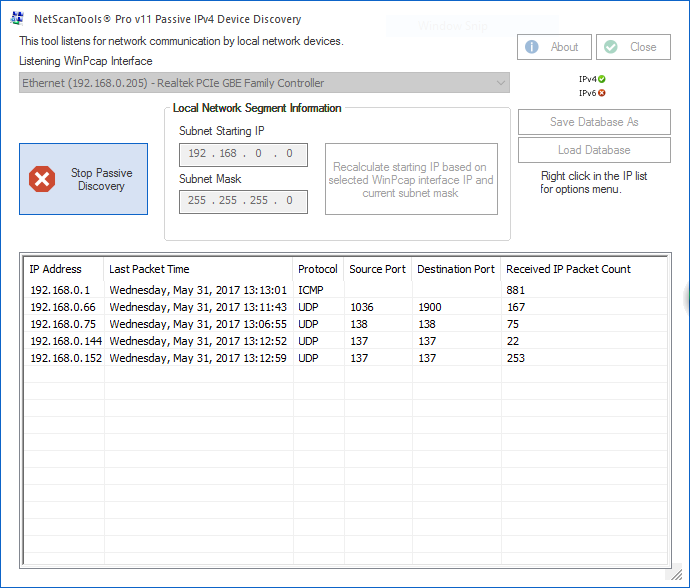
How the Passive Discovery Tool works
Displays Incoming IPv4 Packets from devices on your subnet.
The Passive Discovery tool listens for TCP or UDP or ICMP packets coming into your machine. It reports the time and ports of the packet if applicable. The total received packet count is also shown.
Requires WinPcap for operation.
A video of the Passive Discovery Tool in action!
Not yet available. Coming soon.Try the NetScanTools Pro demo free for 30 days
DEMO Version End User License Agreement (EULA)How to Uninstall


NetScanTools is a registered trademark of Northwest Performance Software, Inc.
'NetScanTools Pro', 'NetScanTools Standard', 'ipPulse', 'Northwest Performance Software' and 'NetScanTools.com', are trademarks of Northwest Performance Software, Inc.
Any trademarked names mentioned herein are the property of their respective owners.
About Us
Email Us
Call Us
Help & Support Center
NetScanTools® Pro Topics
© 2024 Northwest Performance Software, Inc. All Rights Reserved. | Privacy Policy