
 Twitter
 Facebook
 YouTube
 Blog
BlogNetScanTools Pro OS Fingerprinting Tool Description
9-6-2018 Note: we are currently evaluating
the continued inclusion of this tool in NetScanTools Pro. It is
based on ICMP techniques and will not give OS identifications as
accurate as those provided by nmap. If you want the best
identification tool, use
nmap for OS Fingerprinting.
OS (operating system) Fingerprinting - this is a
fascinating subject that is of interest to the security community.
There are many different ways to approach this subject. Some unix
based programs (like nmap) do a very good job of fingerprinting
operating systems using such means as TCP and UDP response characteristics.
Of course, there are some simple ways to identify operating systems
by observing banners or header from a web server, an ftp server
or even a telnet or SMTP login banner. The method presented here
is based upon the ICMP packet response research done by Ofir Arkin
(www.sys-security.com). His paper is called ICMP Usage In Scanning
and it has been the subject of magazine articles and discussions
within the security community. The implementation here should be
considered experimental and should not be considered a complete
implementation of his research in this first version. The results
you see using this tool may or may not be accurate, however, some
operating systems lend themselves to very direct identification
using only ICMP packets and those will be readily apparent.
Without getting too far into the operating specifics, this tool relies on sending altered versions of basic ICMP packet types to the target. We then look at the responses and send further variations of those basic packet types. The responses of the target operating system are noted and use to classify the type of target operating system.
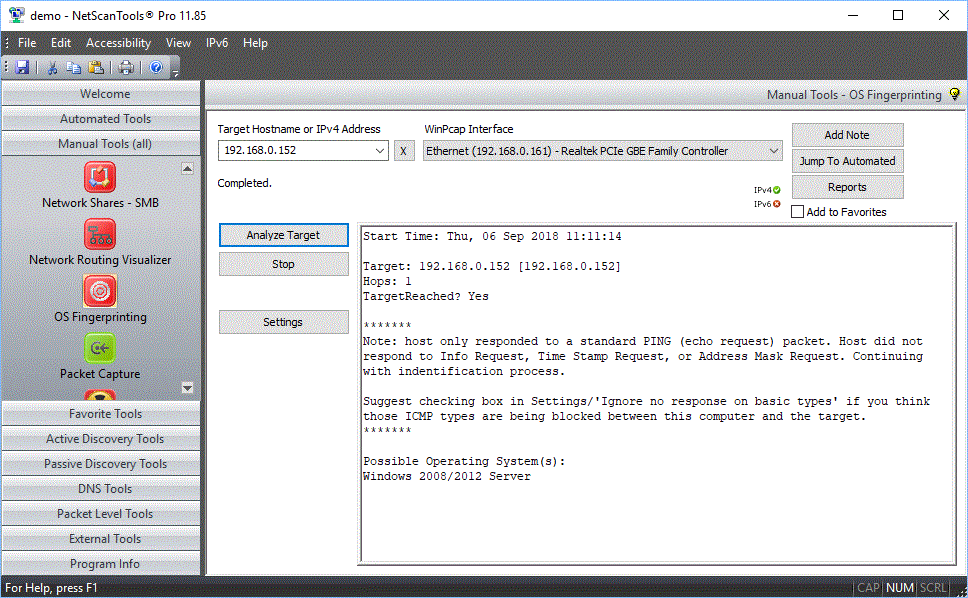
The image below shows successful
identification of a 2012 server.
DEMO Version End User License Agreement (EULA)
How to Uninstall


NetScanTools is a registered trademark of Northwest Performance Software, Inc.
'NetScanTools Pro', 'NetScanTools Standard', 'ipPulse', 'Northwest Performance Software' and 'NetScanTools.com', are trademarks of Northwest Performance Software, Inc.
Any trademarked names mentioned herein are the property of their respective owners.
About Us
Email Us
Call Us
Help & Support Center
NetScanTools® Pro Topics
© 2024 Northwest Performance Software, Inc. All Rights Reserved. | Privacy Policy