
 Twitter
 Facebook
 YouTube
 Blog
BlogNetScanTools Pro Wake-On-LAN (WOL) Tool Description
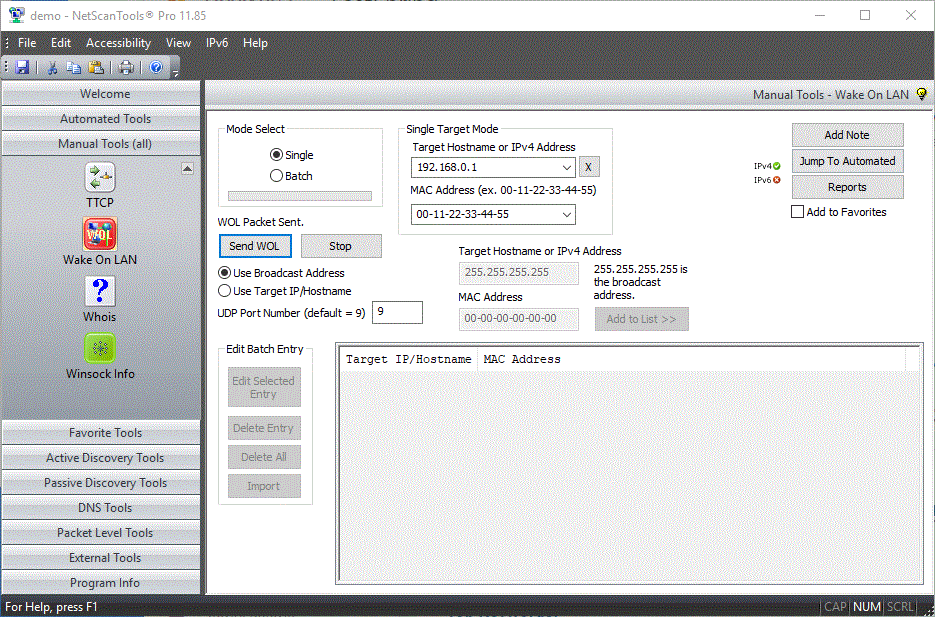
The Wake-on-LAN (WOL) tool allows you to send a target host a Wake-On-LAN magic packet which directs a sleeping system to wake up (if the network interface is enabled to do this usually through the BIOS). IP and MAC address of target system are required.
There are two modes, single and batch. Single sends a UDP packet containing the 'magic packet' information to the port of your choice on a single machine or all machines on a LAN. The batch mode allows you to create a list of IP and MAC addresses. All will be sent the magic packet at the same time in batch mode.
DEMO Version End User License Agreement (EULA)
How to Uninstall


NetScanTools is a registered trademark of Northwest Performance Software, Inc.
'NetScanTools Pro', 'NetScanTools Standard', 'ipPulse', 'Northwest Performance Software' and 'NetScanTools.com', are trademarks of Northwest Performance Software, Inc.
Any trademarked names mentioned herein are the property of their respective owners.
About Us
Email Us
Call Us
Help & Support Center
NetScanTools® Pro Topics
© 2024 Northwest Performance Software, Inc. All Rights Reserved. | Privacy Policy