
 LinkedIn
 X
X Facebook
 YouTube
 Blog
BlogPurpose of the ARP Cache tool
The ARP Cache Tool lets you view and modify your computer's TCP/IP network ARP cache (ARP Table used with IPv4).About the ARP Cache Tool
The ARP Cache Tool allows you to do several things including:
- View your computer's current ARP Cache (ARP Table).
- Add static entries to the ARP Cache.
- Delete any entry from the ARP Cache.
- Flush the ARP Cache.
Related Tool Links
- ARP Scan Tool.
- ARP Ping.
- Packet Generator - has an ARP/RARP packet generating mode.
- Network Neighbors - this is the IPv6 version that shows the neighboring IPv6 devices.
ARP Cache Screenshot
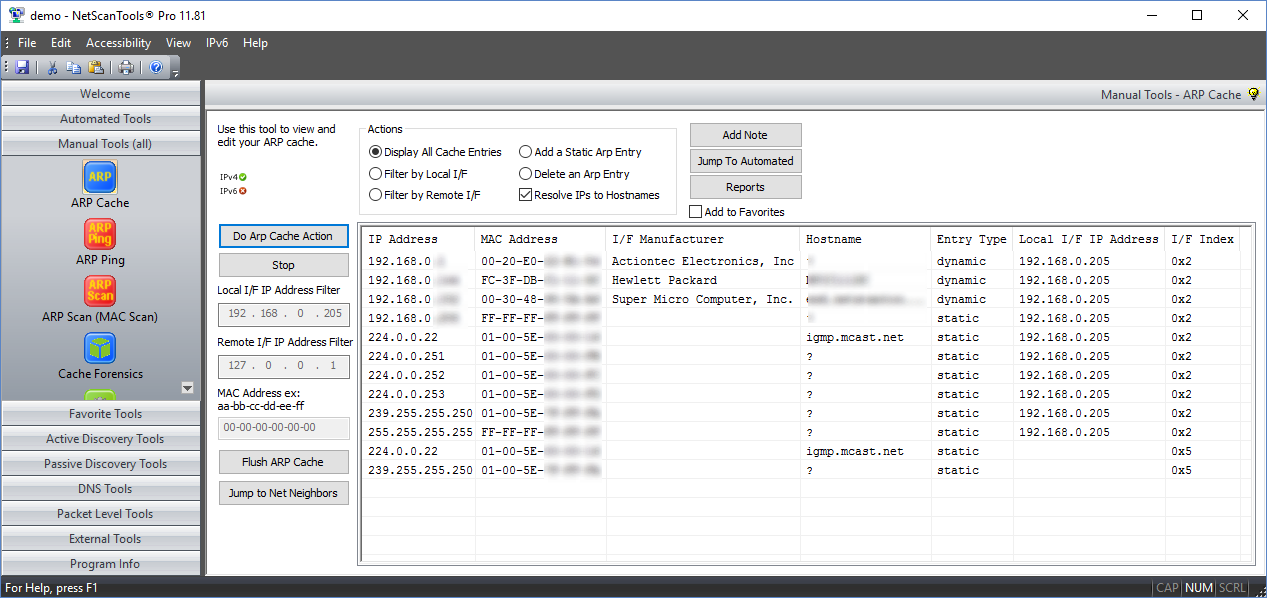
How the ARP Cache Tool works
Displays your ARP Cache.
Shows all entries in the ARP cache. Cache contents can be filtered by Local or Remote Interface IP address. The manufacturer of each remote device's network interface is shown. The hostname for each IP address can be optionally shown.ARP Cache Editing.
Add a static entry to the ARP cache or delete any entry, static or dynamic from the ARP cache.Flush or clear the ARP Cache.
This requires the app to be run with 'Run as administrator' mode.A video of the ARP Cache Tool in action!
Try the NetScanTools Pro demo free for 14 days
DEMO Version End User License Agreement (EULA)How to Uninstall

ARP (Address Resolution Protocol) is a protocol
which associates an IPv4 address with a MAC (Media Access
Control) address (xx-xx-xx-xx-xx-xx) over an ethernet network
segment. ARP is normally not routed beyond a network segment.

NetScanTools is a registered trademark of Northwest Performance Software, Inc.
'NetScanTools Pro', 'NetScanTools Standard', 'ipPulse', 'Northwest Performance Software' and 'NetScanTools.com', are trademarks of Northwest Performance Software, Inc.
Any trademarked names mentioned herein are the property of their respective owners.
About Us
Email Us
Call Us
Help & Support Center
NetScanTools® Pro Topics
© 2026 Northwest Performance Software, Inc. All Rights Reserved. | Privacy Policy