
 LinkedIn
 X
X Facebook
 YouTube
 Blog
BlogPurpose of the ARP Ping tool
This tool Pings an IP address with ARP packets to discover the active device at that IP address.- It can tell you if a device is actually at an IPv4 address on your LAN.
- Shows the response time (latency) of a device to an ARP Packet.
- Shows the MAC address of the network interface on the device.
- Shows the MAC addresses of all devices sharing the same IPv4 address on your LAN. A rare occurrence, but it can happen. Please visit this page for a dedicated duplicate IP detection tool.
About the ARP Ping Tool
The ARP Ping Tool gives you a way to 'Ping' a MAC address on your LAN using ARP packets. This tool is functionally equivalent to the arping open source command line utility.
Why use ARP? Simple - IPv4 devices must respond to ARP packets even if the targeted device uses firewalls or other stealthy methods to hide from ICMP or UDP packet based ping tools like our Ping - Enhanced Tool and Ping Scanner (NetScanner). ARP operates at OSI Layer 2 which is lower level than ICMP or UDP which operate at layer 3.
Since ARP is a non-routable protocol, the device must be on your LAN (local subnet or network segment) and you must know the IPv4 address of the device.
Just like regular Ping, this tool shows the latency timing of ARP responses from the device and unlike regular Ping, it can also tell you if more than one device is sharing the same IP address.
Related Tool Links
- ARP Scan Tool.
- ARP Cache.
- Duplicate IP Scanner.
- Packet Generator - has an ARP/RARP packet generating mode.
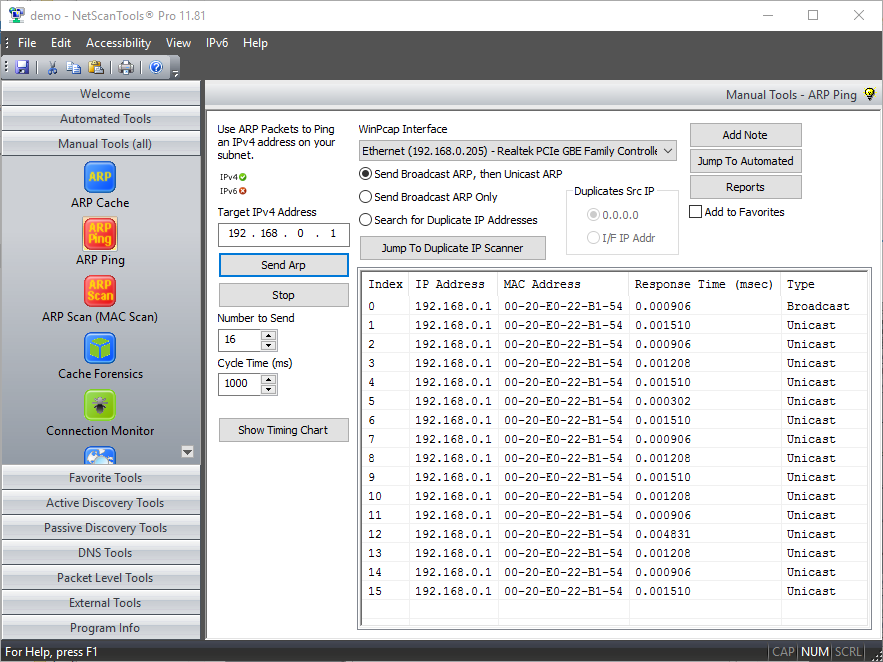
ARP Ping Screenshot
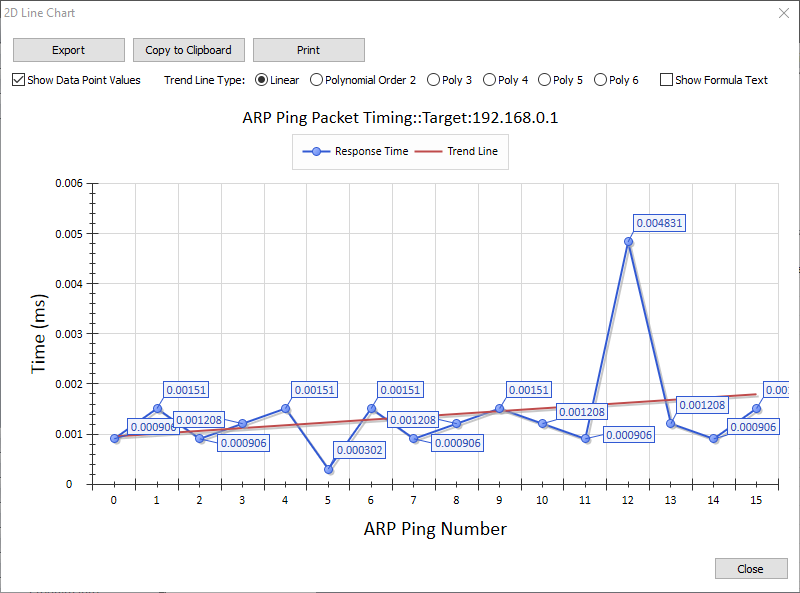
ARP Ping Response Time Graph
How the ARP Scan Tool works
Enter an IP address, then the tool sends ARP in Broadcast, then Unicast Mode.
ARP Ping first pings an IP address on your LAN with a broadcast MAC address in the ARP packet. If an ARP response packet is received from the device, it continues to ping using the unicast ARP packet (by unicast we mean the target MAC address came from the first response to our broadcast).Sends ARP in Broadcast Only Mode
ARP Ping pings an IPv4 address on your LAN with a broadcast MAC address ARP packet and continue to ping the IP Address with a broadcast targetted ARP packet.Duplicate IP Address Detection
ARP Ping can search your LAN for duplicate IPv4 addresses using ARP packets sent to a specific IPv4 address. All responding MAC addresses are shown. Version 11.50 introduced a dedicated Duplicate IPv4 Scanning Tool.Latency Timing in Response to ARP Packets
Response time is shown for each responding ARP ping.A video of the ARP Ping Tool in action!
Link to YouTube Video (If you click on the link below, you will be leaving our website - Warning - YouTube uses cookies)ARP Ping demonstration video
Try the NetScanTools Pro demo free for 14 days
DEMO Version End User License Agreement (EULA)How to Uninstall


NetScanTools is a registered trademark of Northwest Performance Software, Inc.
'NetScanTools Pro', 'NetScanTools Standard', 'ipPulse', 'Northwest Performance Software' and 'NetScanTools.com', are trademarks of Northwest Performance Software, Inc.
Any trademarked names mentioned herein are the property of their respective owners.
About Us
Email Us
Call Us
Help & Support Center
NetScanTools® Pro Topics
© 2026 Northwest Performance Software, Inc. All Rights Reserved. | Privacy Policy