
 LinkedIn
 X
X Facebook
 YouTube
 Blog
BlogPurpose of the Enhanced Ping Tool
The Ping tool is designed to demonstrate that you can contact a target device from your computer. It is a connectivity and protocol latency testing tool.About the Enhanced Ping Tool
The Enhanced Ping Tool is a significantly enhanced version of the classic network troubleshooting tool used to test whether a network device is reachable on an IPv4 or IPv6 network. The device can be anywhere, on your local area network or across the internet. Ping can also be used to determine response time from the device. TCP Ping takes this even further: the round-trip time is TCP latency for the service on the port you are contacting. ICMP Ping of an IPv6 address is supported.
Statistics including packet loss, minimum, average and maximum round-trip time and jitter are also shown. Graphing of the round trip time is shown in a separate window with image saving and printing.
This tool supports three different modes of Ping:
- ICMP Echo Request/Reply Ping packets (similar to Windows command line ping methodology). Supports both IPv4 and IPv6.
- UDP packet to unused port/ICMP port unreachable reply (similar to Unix/Linux classic ping methodology). IPv4 only.
- TCP packet to a used or unused port/TCP packet reply (RST, ACK, etc.). IPv4 only.
Related Tool Links
Ping Timing
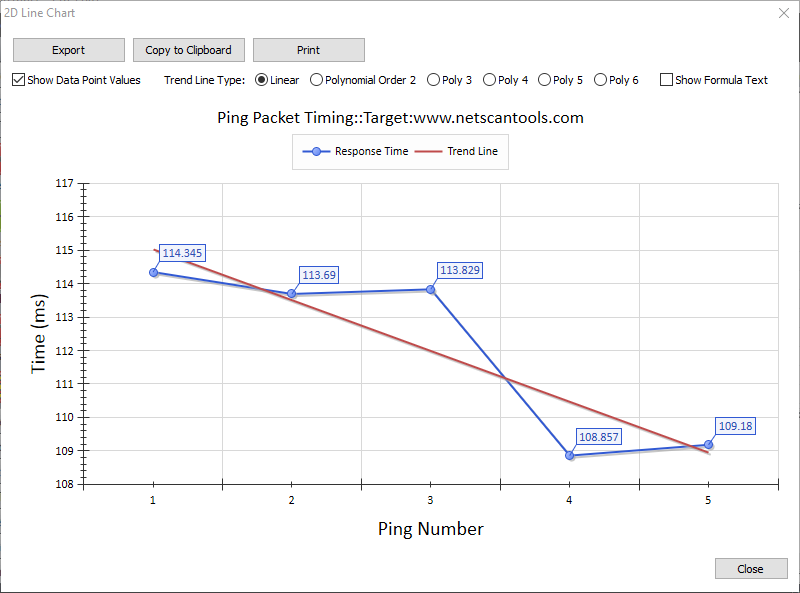
Ping Settings

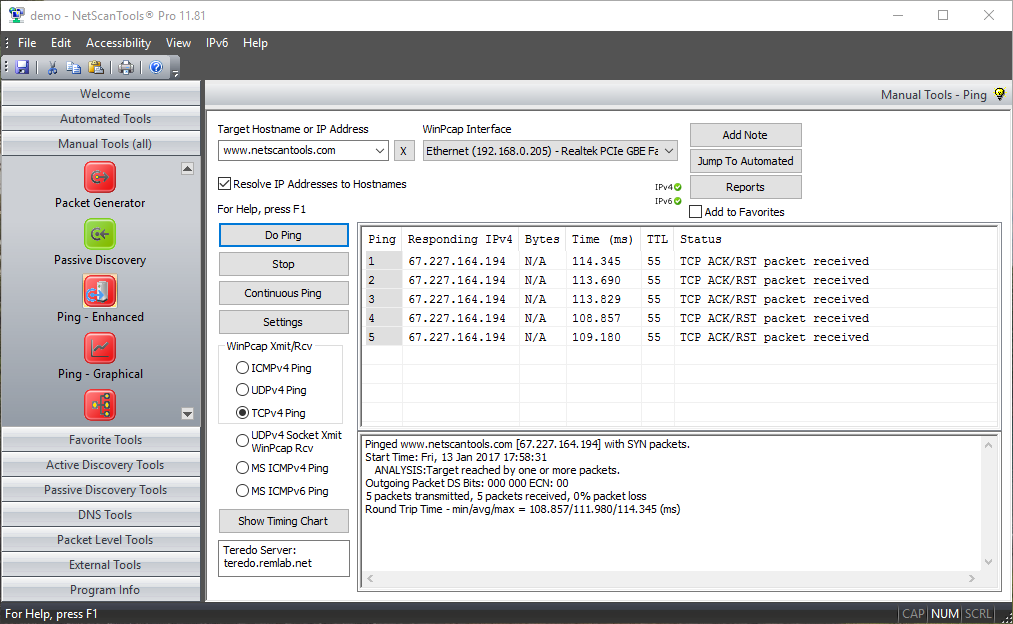
ICMP Ping (IPv4 and IPv6) Modes
ICMP Ping mode uses ICMP echo request packets to ping a target device. The target typically responds with ICMP echo reply packets. The time it takes for a packet to get the target and back is called the round trip time.ICMP Ping mode sends ICMP Echo Request Packets like the command line tool built into Windows.
NetScanTools Pro has three modes of ICMP ping: MS ICMP mode (for IPv4) uses an operating system function to send and receive the ping packets. MS ICMPv6 mode (for IPv6) also uses an operating system funciton to send and receive the ping packets. The other mode for ICMP ping uses WinPcap as both the transmission and reception driver. The WinPcap dependent method allows sub-millisecond timing resolution for ping round trip times in contract to the MSICMP Ping method that has a resolution in the 10s of milliseconds.
- The data portion of the payload for ICMP ping may be a simple 'a-z' repeating character string or the contents of any file you choose (binary or ascii).
- ICMP Ping (WinPcap mode) allows full control over the Differentiated Services CodePoint Bits (DSCP) and the Explicit Congestion Notification bits, ECN-ECT, ECN-CE. You can change these bits to observe the effect on packet delivery through routers. This applies to WinPcap send/receive modes only.
ICMP packets are sometimes blocked by firewalls either between you and the target or on the target itself, so NetScanTools Pro has two other methods of 'pinging' a target: UDP and TCP.
MSICMPv4 Mode

MSICMPv6 Mode

WinPcap ICMPv4 Mode
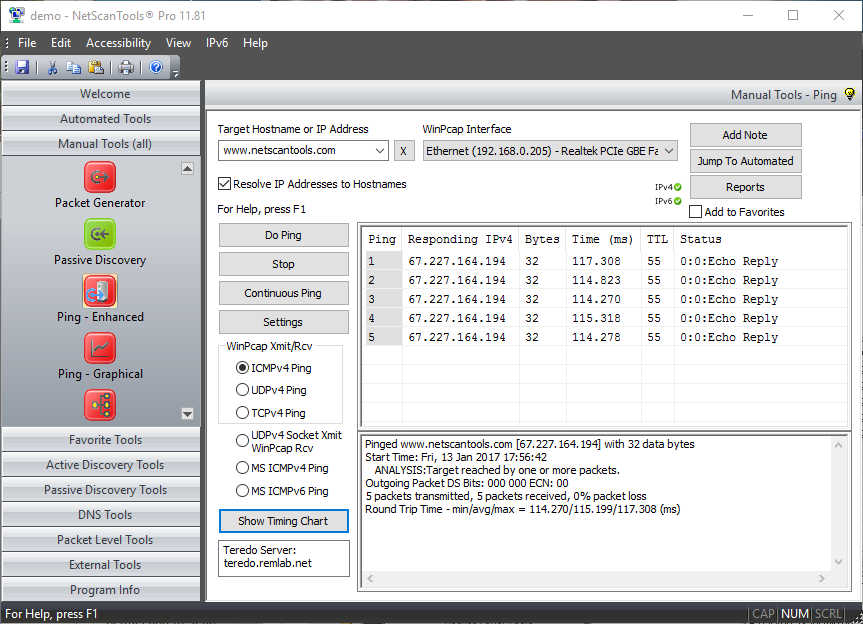
UDP Ping Mode (IPv4 only)
UDP Ping mode uses UDP packets to ping a target. The target typically responds with ICMP port unreachable packets. The time it takes for a packet to get the target and back is called the round trip time. This tool brings UDP Ping to the Windows platform.
NetScanTools Pro has two modes of UDP ping: UDP Socket Xmit mode uses an
operating system function to send UDP packets and WinPcap
to receive the responding ICMP packets. The second mode
uses WinPcap to send the UDP packets and receive the responding
ICMP packets. Both modes allow you to see sub-millisecond
timing resolution for UDP ping.
- The data portion of the payload for UDP ping may be a simple 'a-z' repeating character string or the contents of any file you choose (binary or ascii).
- UDP source and destination ports are separately user-defined.
- UDP Ping (WinPcap mode) allows full control over the Differentiated Services CodePoint Bits (DSCP) and the Explicit Congestion Notification bits, ECN-ECT, ECN-CE. You can change these bits to observe the effect on packet delivery through routers. This applies to WinPcap send/receive modes only.
UDP Mode
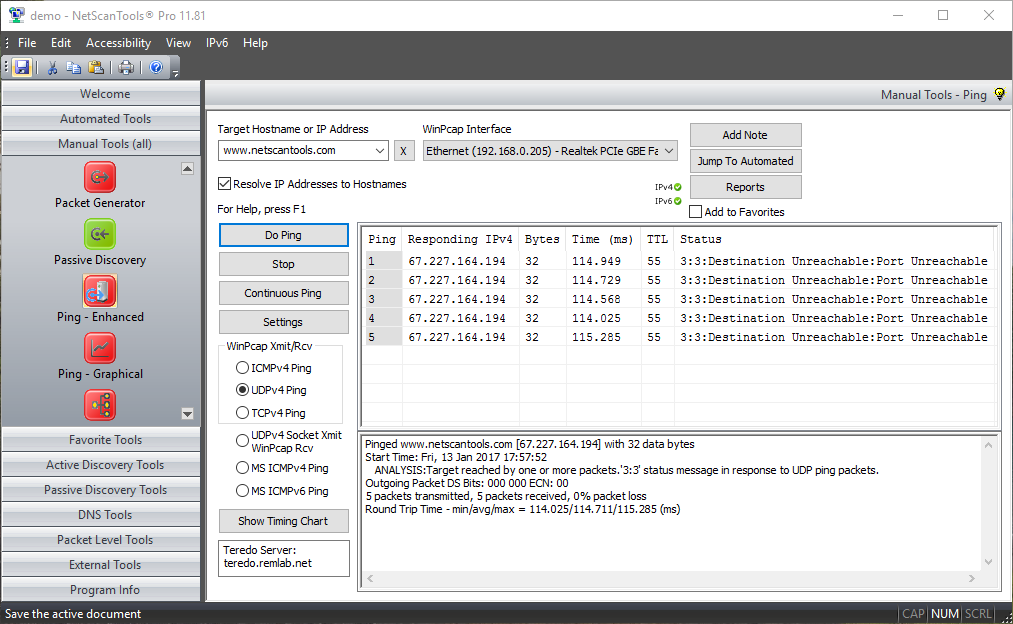
TCP Ping Mode (IPv4 only)
TCP Ping mode uses TCP SYN packets to ping a target. The target typically responds with either TCP SYN/ACK or RST packets. The time it takes for a packet to get the target and back is the round trip time. TCP Ping uses WinPcap to send the TCP packets and receive the responding TCP packets. This mode allows you to see sub-millisecond timing resolution for TCP ping. You can use this tool to determine the latency for web servers or mail servers or just about any TCP service that is present on the target. This tool brings TCP Ping to the Windows platform.
- TCP Ping uses either SYN or ACK packets to elicit a responding TCP packet from the target. ICMP packets are not used in this mode. The round-trip time of the packet pair is the latency of the TCP connection.
- TCP source and destination ports are separately user-defined.
- TCP header fields are user defined and may also be randomly selected. These fields are Sequence, Window, and Acknowledgement.
- TCP packet options section for MTU is included and the value is user defined.
- TCP Ping (WinPcap modes) allow full control over the Differentiated Services CodePoint Bits (DSCP) and the Explicit Congestion Notification bits, ECN-ECT, ECN-CE. You can change these bits to observe the effect on packet delivery through routers.
TCP Mode
A video of the Enhanced Ping Tool in action!
Coming soon.Try the NetScanTools Pro demo free for 14 days
DEMO Version End User License Agreement (EULA)How to Uninstall


NetScanTools is a registered trademark of Northwest Performance Software, Inc.
'NetScanTools Pro', 'NetScanTools Standard', 'ipPulse', 'Northwest Performance Software' and 'NetScanTools.com', are trademarks of Northwest Performance Software, Inc.
Any trademarked names mentioned herein are the property of their respective owners.
About Us
Email Us
Call Us
Help & Support Center
NetScanTools® Pro Topics
© 2026 Northwest Performance Software, Inc. All Rights Reserved. | Privacy Policy