
 Twitter
 Facebook
 YouTube
 Blog
BlogGeneral NetScanTools Pro Support Topics
Run the installation exe, accept the license, enter the serial number and install. You will need to register if the software has not been installed on the computer before.
How do I uninstall NetScanTools Pro?
Depending on your Windows version, use Settings/Apps or Control Panel/Programs and Features or Control Panel/Add-Remove programs. You can also use the uninstall link from within the NetScanTools Pro program group. WinPcap or Npcap must be uninstalled separately but may be required by other software such as Wireshark or Nmap.
How to move NetScanTools Pro to a new computer. Instructions for version 11 are here.
I do not have the NetScanTools Pro 11.x full installer - can I get it?
We did ask you to make a backup of the installation file in a safe place...but you can request the installation file from tech support. The version you get will depend on whether your maintenance plan is currently active. Software older than version 11 may not be available.
Does NetScanTools Pro 11.x run on Windows 10?
NetScanTools Pro has been developed on Windows 10 ever since Windows 10 was released.
Does NetScanTools Pro run on any version of Windows?
As of May 2020 NetScanTools Pro v11.91 runs on Windows 10 (1909 and 1903), 8.x, 7. Requires GUI, not a command line tool. No other Windows versions have been tested. Support for Windows 7 and 2008 stopped in January 2020 since Microsoft now longer supports those Windows versions.
Does NetScanTools Pro require Administrator Privileges?
Mostly no. A couple exceptions: The TimeSync tool requires it to set your clock to match an NTP server - you can still check your clock on normal privileges. The Ping Scanner requires it if you use the 'Do Subnet Mask Scan' option (on lower privs you will see 'sendto failure: An attempt was made to access a socket in a way forbidden by its access permissions., type 17' - this may change in versions later than 11.91).
Does NetScanTools Pro USB Version require WinPcap or Npcap?
Yes. You need to install either of those (preferrably Npcap) on any host that will be using NetScanTools Pro USB Version. See WinPcap and Npcap Topics below. NOTICE: WinPcap and Npcap do not run on ARM64 based computers like the Microsoft Surface Pro X. Npcap may eventually run on ARM in the future.
What is Npcap and how does it compare to WinPcap?
Npcap is a 'fork' of WinPcap which is a packet driver originally developed for Ethereal which became Wireshark. WinPcap ceased active development in 2013 and was based on NDIS 5. Npcap is under active development by the nmap developers. There a license restrictions which prevent us from distributing Npcap, but you may download and install it yourself within the guidelines of the Npcap license. Npcap is based on NDIS 6 and is designed for use with Wireshark and Nmap on Windows 10. Use WinPcap for older Windows versions.
A few common problems are addressed here.
Contact Tech Support
WinPcap and Npcap Topics
Do I really need WinPcap or Npcap to run NetScanTools Pro?
Yes, you need either WinPcap (get it here) or Npcap (installed with WinPcap API compatibility mode, get it here). They are packet level drivers we use to capture and send certain network packets. USB version users: you must have one of these two drivers installed on the host computer.
I have an ARM64 based computer running Windows 10. WinPcap and Npcap install but the driver cannot start.
WinPcap and Npcap do not run on ARM64 based computers like the Microsoft Surface Pro X. Npcap may eventually run on ARM in the future - please read this Npcap ARM status update.
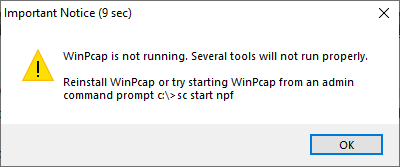
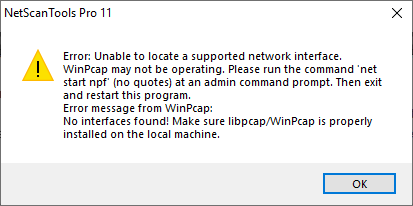
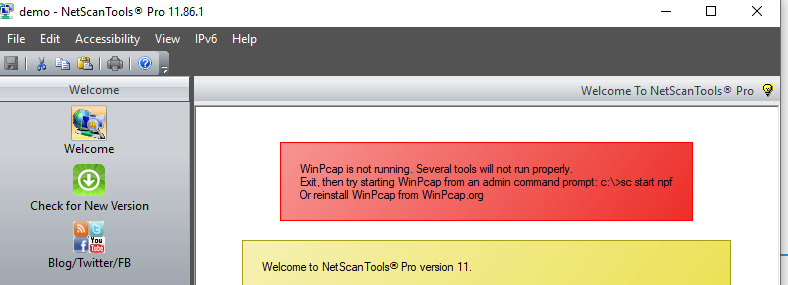
WinPcap or Npcap not working on Windows 10 after upgrading to 1803 or 1809. As in the screenshots below, after starting NetScanTools Pro 11 you will see these first two popups, then the main welcome window shows a message about the effects of WinPcap not running.
Older NetScanTools Pro 11 topics
Solution: You are running the program on a computer with color depth of 16 or less bits. Please change it to 32 bit color depth (right click on desktop/properties/settings). The reason it appears more on the Server operating systems is they are typically installed with 16 bit color resolution. We have identified the cause and it will be corrected in the next release so that you can use it on 16 or even 8 bit color depths.
NetScanTools Pro 11.00: On first startup, after defining a database, you see: "SQLITE_CANTOPEN[14]: unable to open database file." - this message means that the directory you selected either does not exist or you do not have sufficient privileges to create a read/write database file in that location. This was fixed in 11.01.
Solution: Use 'Documents' or 'My Documents' as the location for your database file. Be sure to use an existing directory.
NetScanTools Pro v10 and older topics
Solution: If you have installed version 10.93, please move to 10.94 or later soon. Use Help/Check for New Version, then login and download the updated version. There are no functional changes to this new release.
Reminder: when using NetScanTools Pro 10.x on...
Windows 7: Your NetScanTools Pro version must be 10.81 or newer.
Windows Vista/2008 Server: Your NetScanTools Pro version must be 10.42 or newer.
How to download NetScanTools Pro Updates
NetScanTools Pro 11.x and 10.x
In
either Welcome or Online left panel group, click on the
Check for New Version icon - in later versions, you can
select the menu item Help/Check for New Version. If your
maintenance plan is current and active, please click on a
download link. Then login using
the credentials shown on the Check for New Version control
window in the program.
Maintenance Plan renewal information is here.
NetScanTools Pro 2004 (v9)
In either Welcome or Online
left panel group, click on the Check for New Version icon.
You can also press the Check for Service Pack button on the
Program Info/About NetScanTools Pro window. Follow the
on-screen instructions to download the service pack. The
last version was 9.4 dated June 14, 2005.
NetScanTools
Pro 2003 (v8)
In NetScanTools Pro, click on the About
tab, then press the Check for Service Pack button on the
About tab. Follow the on-screen instructions to download the
service pack. The last version was NetScanTools Pro 2003
Service Pack 4 (v8.4) dated May 25, 2004.
NetScanTools Pro 2002 (v6/v7)
Please click here for service packs and support for
NetScanTools Pro 2002.
NetScanTools Pro 2001 (v4/v5)
Please click here for service packs and support for
NetScanTools Pro 2001.
NetScanTools Pro 2000
(v1/v2/v3)
Please click here for service packs and support for
NetScanTools Pro 2000.

NetScanTools is a registered trademark of Northwest Performance Software, Inc.
'NetScanTools Pro', 'NetScanTools Standard', 'ipPulse', 'Northwest Performance Software' and 'NetScanTools.com', are trademarks of Northwest Performance Software, Inc.
Any trademarked names mentioned herein are the property of their respective owners.
About Us
Email Us
Call Us
Help & Support Center
NetScanTools® Pro Topics
© 2024 Northwest Performance Software, Inc. All Rights Reserved. | Privacy Policy